Why Browser Agents Are So Expensive (And When to Skip Them)
A browser agent pays to re-read the same page on every step. Where the money actually goes, why open source doesn't fix it, and which of your tasks never needed a browser.

- Why are browser agents so expensive?
- What does it cost per task, per hour, and per month?
- Does a free tier or an open-source agent fix this?
- Browser agent vs Playwright: which do you actually need?
- Do browser agents actually work?
- Why are they so slow?
- When should you use one instead of an API?
- The rule that holds up
- The short version
The bill for a browser agent rarely matches the estimate. You priced it as “a few LLM calls per task,” ran it a thousand times, and discovered the model was doing something closer to re-reading a novel before every sentence it wrote.
This isn’t a you problem. When researchers asked eight frontier models to predict their own token usage on agentic coding tasks, the models systematically underestimated the real cost, correlating with actual spend at no better than 0.39. If the models can’t forecast this on the best-studied agent workload there is, your spreadsheet had no chance.
One developer documented 180 million tokens a month — about $3,600 running browser agents, and almost none of that was spent on reasoning. It was spent re-describing web pages to a model that had already seen them.
This post covers where that money actually goes, why the two most common fixes don’t work, and the question worth asking before you reach for a browser at all.
Why are browser agents so expensive?
Because a browser agent has no memory of the page. It has a context window containing a transcript of the page, and it rebuilds that transcript on every single step.
Here’s the loop. The agent takes a screenshot or serializes the accessibility tree, sends it to the model, gets back “click element 47,” clicks it, and then — because the page changed — takes another screenshot and sends the whole thing again. Step 2’s prompt contains step 1’s page and step 2’s page. Step 10’s prompt contains all ten.
That’s quadratic growth in a workflow you probably estimated as linear:
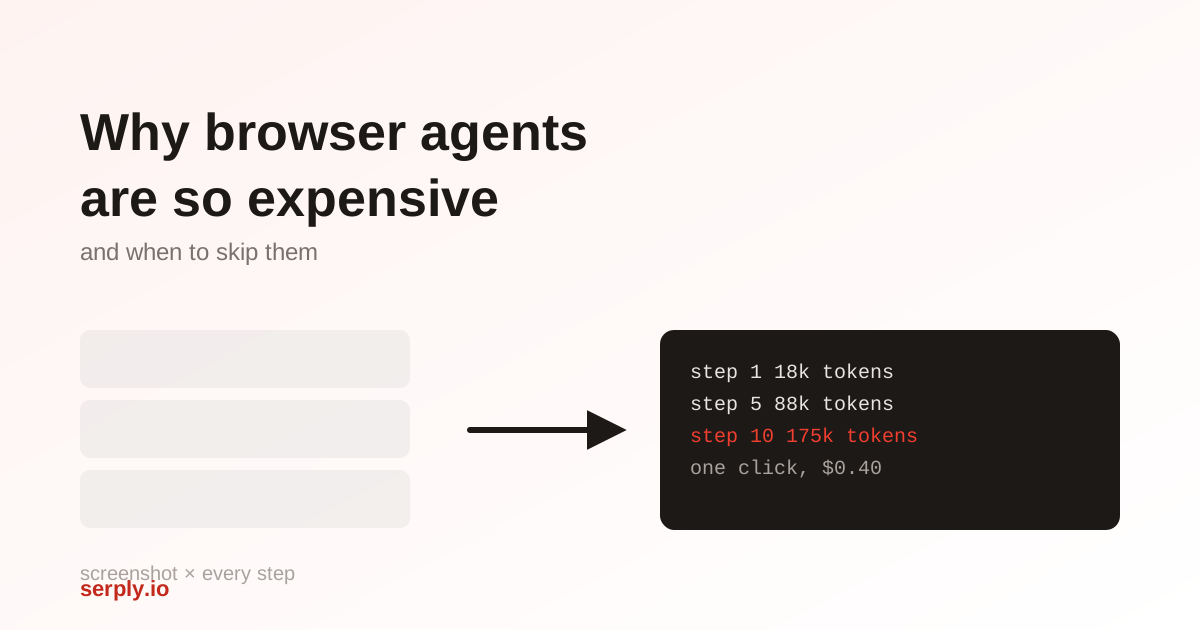
step 1:   ~18k tokens  (one page)
step 2:   ~35k tokens  (two pages)
step 5:   ~88k tokens
step 10: ~175k tokens  ← one click now costs more than most RAG queries
By step 10, agents are sending roughly 175,000 tokens per action, which works out to about $4 for a single run of one workflow on frontier-model pricing.
The kicker is that the expensive part isn’t the thinking. It’s the nav bar, the cookie banner, the footer, the analytics script tags, and the eleven ad slots — all faithfully serialized and re-sent, over and over. We’ve written before about the token cost of feeding agents raw HTML, and a browser agent is that same problem multiplied by the number of steps.
What does it cost per task, per hour, and per month?
This is where most cost estimates go wrong, because people budget for the wrong line item.
You can model the token side directly. If each page costs roughly P tokens to serialize and the agent runs N steps, the total input across the run is the quadratic sum:
total_input_tokens ≈ P × N × (N + 1) / 2At a typical P of 18,000 tokens and N of 10 steps, that’s about 990,000 input tokens for one task. Now price it against Browser Use’s published gateway rates — $0.50 per 1M input tokens, $3.00 per 1M output, $0.10 per 1M cached — and add the infrastructure, using Browserbase’s $0.10–$0.12 per browser hour:
| Component | One 10-step task | Share |
|---|---|---|
| Input tokens, uncached | ~990k → $0.50 | ~99% |
| Input tokens, assuming 75% cache hits | ~990k → $0.20 | ~99% |
| Output tokens (~10–15 per action) | ~150 → $0.0005 | negligible |
| Browser time (30s @ $0.12/hr) | $0.001 | ~0.2% |
(The cache row is an illustrative hit rate, not a measured one — your own will depend on how stable the page prefix is between steps.)
The browser is not the expensive part. Browser hours are a rounding error — a tenth of a cent against fifty cents of tokens. If you’re searching for a “cost per hour” figure to budget against, you’re optimizing the wrong variable by roughly two orders of magnitude.
Scale it out and the monthly number follows from task volume, not from infrastructure:
| Volume | Uncached (~$0.50/task) | Well-cached (~$0.20/task) |
|---|---|---|
| 100 tasks/day | ~$1,500/mo | ~$600/mo |
| 1,000 tasks/day | ~$15,000/mo | ~$6,000/mo |
Which puts that $3,600/month anecdote right where you’d expect it to land.
Treat those as centres of gravity rather than forecasts. The same coding-agent study found token usage is inherently stochastic — runs on an identical task varied by up to 30x, and that input tokens rather than output tokens drive the total, which is exactly the asymmetry in the table above. It also found that spending more doesn’t buy accuracy: success tended to peak at intermediate cost and flatten after that, so an agent burning 10x the tokens is usually just lost.
Two levers actually move these numbers: caching (the gap between the columns) and step count — and because cost is quadratic in N, cutting a 10-step workflow to 5 steps cuts the tokens by about 73%, not 50%.
Does a free tier or an open-source agent fix this?
Short answer: no, and the arithmetic above is why.
Browser Use, Playwright, and most of the popular agent frameworks are open source and free to run. Self-hosting removes the platform fee and the browser-hour charge. Look back at the table: those are the ~1% line items. The 99% is model tokens, and those bill the same whether the orchestration code came from GitHub or a vendor.
Open source is a genuine win for control, debuggability, and avoiding per-session pricing. It is not a cost fix, because it doesn’t touch the term that dominates.
The things that do reduce the token bill are architectural, and available in both hosted and self-hosted setups:
- Prompt caching. The single biggest lever, because cached tokens run 5x cheaper on Browser Use’s gateway and the re-sent page prefix is highly cacheable by construction.
- Skip screenshots when the accessibility tree suffices. Each screenshot adds ~0.8 seconds to inference latency plus its encoded tokens.
- Prune the serialized page before it enters context, the same way you’d strip boilerplate from scraped HTML.
- Cap the step count, since cost grows with its square.
A free tier changes who pays for the first few hundred tasks. It doesn’t change the shape of the curve.
Browser agent vs Playwright: which do you actually need?
Worth separating, because they get compared as if they were alternatives and they aren’t quite.
Playwright is scripted automation. You write the selectors, it clicks them. Deterministic, fast, and the marginal cost per run is essentially the CPU time — no model in the loop.
A browser agent puts an LLM in the loop on every step to decide what to click. That’s what makes it flexible, and it’s the entire reason it costs what it costs.
So the decision is about how much your task varies:
| Playwright | Browser agent | |
|---|---|---|
| Task is identical every run | ✅ right tool | ❌ paying to re-derive |
| Page structure is stable | ✅ | ❌ |
| Task varies per user/input | ❌ brittle | ✅ |
| Page changes often | ❌ selectors drift | ✅ adapts |
| Cost per run | ~$0 | ~$0.20–$0.50 |
The failure mode worth naming: using an agent for a task that never changes. If you’re scraping the same three fields off the same page layout every hour, an agent re-solves that problem from scratch on every run and bills you for it — “every run uses AI tokens, even when you’re doing the exact same thing for the 1,000th time”.
A reasonable hybrid: let the agent solve the task once, capture the actions it took, then replay them as a script until it breaks — and fall back to the agent only when it does.
Do browser agents actually work?
This is the cost most teams discover last, and it’s the expensive one, because a failed run costs the same as a successful one.
Benchmarks look encouraging. WebArena scores have climbed from around 14% to 71.2% for ColorBrowserAgent, with newer entries tracked as high as 74.3%. On OnlineMind2Web, Browser Use 1.0 reports 65.7% accuracy, matching Gemini 2.5 Computer Use.
But benchmarks are frozen, self-hosted websites, and the live web isn’t frozen. The gap shows up inside the benchmark papers themselves: the same ColorBrowserAgent that scores 71.2% on WebArena drops to 47.4% when transferred zero-shot to a suite it wasn’t tuned against. That’s a third of its performance lost just by changing which sites it’s pointed at — before anything about the real web, like a redesign or a bot check, enters the picture. Treat a headline benchmark score as a ceiling you won’t reach, not a rate you can plan against.
The documented failure modes are worth memorizing, because each one is a retry you’re paying for:
- DOM selector drift — a class name changed overnight
- Screenshot ambiguity — two buttons look identical to the model
- Login state — the session expired mid-task
- Modal interruptions — a newsletter popup ate the click
- Rate-limit cliffs — the site noticed
- Irreversibility — the agent already submitted the wrong form
Now do the arithmetic. At a 70% success rate with one retry on failure, your effective cost per completed task is about 1.4x the sticker price. At 40%, it’s 2.5x.
Why are they so slow?
Speed compounds all of the above, because a slow agent is one you can’t put in front of a user.
A well-tuned browser agent runs about 3 seconds per step, and Browser Use reports 68 seconds for an average task against 225 seconds for Gemini 2.5 Computer Use, 285 for Claude Sonnet 4.5, and 330 for OpenAI’s Computer-Using Model. Even the fast end of that range is a background job, not an interaction.
Compare it to the same lookup as a direct request. A structured search API call returns in ~950ms. The underlying reason is unglamorous: browsers render pages for human eyes — fonts, images, layout passes, ad auctions. Your agent pays the full rendering cost of a UI it cannot see.
When should you use one instead of an API?
Here’s the question that saves the most money, and it’s narrower than it sounds:
Does this task require the rendered, interactive state of a page that only a logged-in human could reach?
If yes, use the browser. Filling a multi-step form, navigating an authenticated dashboard, clicking through a checkout — no API replicates those.
If no, you’re paying browser prices for something that is fundamentally a read. And a large share of what people point browser agents at is a read: “find the top 10 results for this query,” “get the current price,” “check what news broke today,” “pull the top comments from this thread.” No interaction, no session, no state. The agent renders a page built for humans, screenshots it, spends 18,000 tokens describing it, and extracts ten titles and ten URLs — about 200 tokens of actual information.
For that half of the work, a structured API removes the browser from the loop entirely. The Serply search API returns the same SERP as JSON:
import os
import httpx

HEADERS = {"X-Api-Key": os.environ["SERPLY_API_KEY"]}


def search(query: str, num: int = 10) -> list[dict]:
    r = httpx.get(
        f"https://api.serply.io/v1/search/?q={query}&num={num}",
        headers=HEADERS,
        timeout=10.0,
    )
    r.raise_for_status()
    return [
        {"title": x["title"], "url": x["link"], "snippet": x.get("description", "")}
        for x in r.json()["results"]
    ]
When you need the page body, /v1/request returns it as markdown rather than HTML, so the boilerplate never reaches the context window:
def read(url: str) -> str:
    r = httpx.post(
        "https://api.serply.io/v1/request",
        json={"url": url, "response_type": "markdown"},
        headers=HEADERS,
        timeout=20.0,
    )
    r.raise_for_status()
    return r.text
At $1.50 per 1,000 requests dropping to $0.75 at volume, with one credit per successful uncached request and cached responses free, that’s a couple of orders of magnitude below the per-task numbers in the table above — for the subset of work that never needed rendering.
The rule that holds up
Route by task shape rather than using one tool for everything:
def gather(task: str, url: str | None = None) -> str:
    if task in {"search", "news", "prices", "reviews", "discussion"}:
        return structured_api(task)        # ~950ms, 1 credit

    if url and not requires_auth(url):
        return read(url)                   # markdown, no rendering

    if is_repeatable(task):
        return replay_script(task)         # Playwright, ~$0

    return browser_agent(task, url)        # only when state is unavoidable
Reads go to an API, repeatable interactions go to a script, and the browser agent handles what’s genuinely left: variable, interactive, authenticated work. In a typical research or monitoring agent that moves the large majority of calls off the expensive path.
Worth pairing with bounding your agent’s tool calls, which stops the loop that generates most of the volume, and why search alone isn’t enough when you need page bodies rather than snippets.
The short version
Browser agents are expensive for a structural reason, not a tuning reason: they re-serialize an entire human-facing page on every step, so cost grows with the square of the task length while the useful information stays flat. The browser itself is ~1% of that bill, which is why self-hosting and free tiers don’t move it — and why caching and step count do.
None of that argues against browsers where interaction is required. It argues against using one to read a search results page.
If a chunk of your agent’s work is read-shaped, you can test the difference without a card — 2,500 free credits is enough to run your actual workload both ways and compare.